
Parents searching for a kids smartwatch without internet are usually not asking for a watch with absolutely no network connection. What they often want is a child-friendly watch that can still make calls, share location and send SOS alerts without giving the child an open browser, app store or social-media feed.
What Parents Usually Mean by a Kids Smartwatch Without Internet
A truly offline watch cannot send a live GPS position to a parent’s phone, make a 4G video call or transmit an SOS alert through the mobile network. Those features require connectivity.
So when parents search for a “kids smartwatch without internet,” the more realistic requirement is usually:
- no open browser;
- no app store;
- no social-media feed;
- no unrestricted messaging platform;
- parent-approved contacts only;
- but still able to call trusted adults and share location.
That is the role a closed-interface kids watch is designed to fill.
Why Parents Want Less Open Internet Access
For a younger child, a first connected device does not necessarily need the same open-ended features as a smartphone. A parent may want communication and location without introducing another device that encourages browsing, app downloads or endless notifications.
The American Academy of Pediatrics’ media guidance emphasizes that the quality and context of media use matter, not just raw screen-time minutes. A closed-function watch can make that easier for some families because the device has a narrow purpose from the beginning.
REXQU KidView: Closed Interface, Connected Features
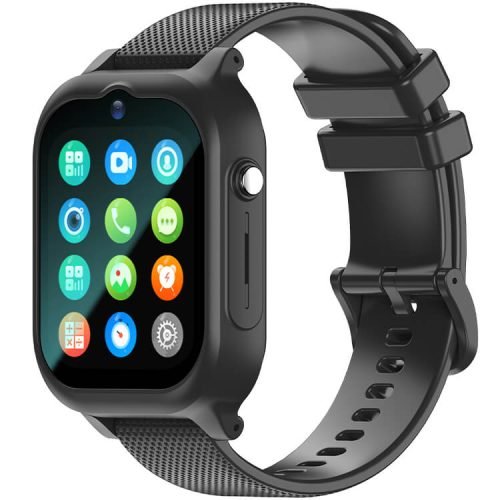
The REXQU KidView is the strongest fit in the current REXQU range for parents who want a simplified first connected watch.
Its child-facing interface is built around a limited set of functions such as:
- voice and video communication;
- camera;
- calculator;
- alarms;
- location-related functions managed through the parent app.
The key point is what it does not behave like: an open smartphone with a browser and downloadable app ecosystem.
Does KidView Still Use the Internet?
Yes, in the technical sense. The watch uses mobile data and its companion ecosystem to communicate with the parent app and support connected features.
That connection is what allows:
- live or refreshed location updates;
- video calling;
- voice communication;
- safe-zone alerts;
- remote parent-app management;
- SOS communication.
So it would be misleading to describe KidView as completely offline. It is better described as a connected kids smartwatch without open web browsing or an app store.
Why a SIM Card Is Still Required
KidView uses a compatible 4G nano-SIM for cellular features. Without an active compatible plan, connected functions away from WiFi can be limited or unavailable.
Before choosing a carrier, read the REXQU kids smartwatch SIM card guide.
KidView vs Giving a Child an Old Smartphone
| Feature | KidView-style kids watch | Typical old smartphone |
|---|---|---|
| Open browser | No open-browser emphasis | Usually yes unless restricted |
| App store | Closed feature set | Usually available unless restricted |
| Parent-approved contacts | Core design principle | Requires setup and parental-control tools |
| GPS/location | Built around parent app | Available through phone services/apps |
| Wearability | Stays on wrist | Can be left in a bag or room |
An old smartphone can absolutely be locked down with parental-control software, but doing so requires more configuration and ongoing management. A child-focused smartwatch starts from a narrower set of functions.
KidView vs KidTrack vs KidGuard Pro
| Model | Main strength | Display | Best for |
|---|---|---|---|
| KidView | Simplified first-watch interface | 1.83″ | Parents prioritizing simplicity and larger screen |
| KidTrack | 47g lightweight body | 1.52″ | Smaller wrists / lightweight value |
| KidGuard Pro | Layered location + video check-in | 1.4″ | Location-focused families |
Can Strangers Call the Watch?
REXQU’s kids models are designed around parent-managed contact lists. Parents should configure approved contacts in the companion app before giving the watch to the child and test the setup themselves.
Read the kids smartwatch parental controls guide for a full setup checklist.
Can the Child Browse YouTube, Social Media or Websites?
KidView is positioned as a closed-function child watch rather than an open browser/app-store device. That is exactly why it appeals to parents who want communication and location without handing over an unrestricted mini-smartphone.
Parents should still review the current product and companion-app features at setup because software can change over time.
Can the Watch Work Completely Offline?
Only for basic local functions. Without mobile data or WiFi, the watch may still display time and use certain local features, but the parent cannot expect live remote location, 4G calling or app-based alerts to work normally.
If your goal is a watch with absolutely no network connectivity at all, a simple digital watch or offline activity tracker may be a better fit than a GPS/calling kids smartwatch.
Why “No Internet” and “No Browser” Are Not the Same Thing
This distinction is important for shopping:
- No internet connection: no mobile data or WiFi communication.
- No browser: the device can still be online for specific parent-controlled functions but does not give the child open web access.
- No app store: the device uses a fixed feature set rather than allowing unrestricted downloads.
Most parents looking at KidView are really asking for the second and third items.
GPS Still Needs Connectivity to Reach the Parent
The watch can use GPS to calculate a location, but that position normally needs a data connection to reach the parent app when the watch is away from WiFi.
For a detailed explanation, see the kids smartwatch GPS tracking guide.
Geofencing Still Needs Connectivity Too
Safe-zone alerts depend on the watch reporting location to the parent app. If mobile data is unavailable, an alert can be delayed until the device reconnects.
See the kids smartwatch geofencing guide for realistic expectations.
How to Set Up a Closed-Internet Kids Watch Properly
- Install the correct parent app.
- Create a strong parent account password.
- Activate the compatible nano-SIM.
- Add only trusted contacts.
- Set SOS contacts.
- Create home and school safe zones.
- Test voice and video calls.
- Test location away from home WiFi.
- Explain to the child what the watch is for.
- Review the settings every few months.
What Family Rules Still Matter?
A closed interface reduces the amount of digital access a parent needs to manage, but it does not replace family rules. Children still need clear guidance on:
- when they may make calls;
- when video calling is appropriate;
- when to use SOS;
- whether the watch is allowed during class;
- who is allowed to view their location;
- where the watch should be charged.
Privacy Still Matters Even Without a Browser
A device can have no browser and still handle sensitive data such as location history and contact information. Parents should keep the companion-app login private, review app permissions and limit access to trusted caregivers.
The FTC’s children’s privacy resources provide useful background on connected devices and children’s data.
Frequently Asked Questions About Kids Smartwatches Without Internet
Can KidView make calls without internet?
Its connected calling features rely on a compatible mobile connection. “Without internet” in this context means no open web browsing, not no data connection at all.
Does KidView have an app store?
KidView is designed around a fixed child-focused feature set rather than an open app-store experience.
Can my child browse the web?
The watch is not positioned as an open web-browsing device. That is one of the reasons it appeals to parents seeking a simpler first connected watch.
Can the watch send GPS updates without mobile data?
It may be able to determine a location locally, but the position normally needs connectivity to reach the parent app remotely.
Which REXQU watch is best if I want the least smartphone-like experience?
KidView is the clearest fit because it combines a larger, simplified child-facing interface with parent-controlled communication and location features.
Bottom Line
A kids smartwatch without internet is often better understood as a kids smartwatch without open internet access. The REXQU KidView still uses 4G/mobile data for calls, location and parent-app communication, but it avoids the open-ended browser and app-store experience many parents do not want for a younger child.
Compare KidView with the other current models in the Best Kids Smartwatch buying guide or browse the REXQU kids smartwatch collection.
Connected features depend on mobile data, carrier compatibility, network coverage and app connectivity. A closed interface reduces open browsing but does not make the device completely offline.