
Choosing the best kids smartwatch is less about finding the watch with the longest feature list and more about matching the device to your child’s age, routine and level of independence. For most parents, the priorities are straightforward: reliable location tracking, easy calling, an SOS function, parent-controlled contacts, useful battery life and enough water resistance for ordinary childhood.
This kids smartwatch buying guide compares the three current REXQU models — KidView, KidTrack and KidGuard Pro — and explains which features matter most before you buy.
What Should Parents Look for in a Kids Smartwatch?
A good kids smartwatch sits somewhere between a basic watch and a first phone. It should give a child a simple way to contact trusted adults while giving parents useful control over location, contacts and settings.
The most important features to compare are:
- GPS and location tracking: how the watch finds its position and how easily the parent app shows it.
- Geofencing: whether you can create safe zones around places such as home or school.
- Calling and video calling: whether the child can communicate with approved contacts from the wrist.
- Parental controls: whether strangers can call the watch or the child can access an open browser or app store.
- SOS: how quickly the child can trigger an alert or call a trusted contact.
- SIM and data requirements: whether the watch needs its own nano-SIM and mobile plan.
- Battery life: whether charging every night fits your household routine.
- Weight and fit: especially important for smaller wrists.
- Water resistance: useful for rain, hand-washing and accidental splashes.
If one of these features is your main priority, REXQU already has dedicated guides on kids smartwatch GPS tracking, geofencing, parental controls, SIM cards, battery life, watch weight and water resistance.
REXQU Kids Smartwatch Comparison
| Model | Best for | Display | Water rating | Price |
|---|---|---|---|---|
| KidView | Simple first smartwatch, larger screen | 1.83″ | IPX7 | $99.97 |
| KidTrack | Lightweight everyday wear | 1.52″ | IPX7 | $89.97 |
| KidGuard Pro | Layered location tracking + video check-in | 1.4″ | IP67 | $109.97 |
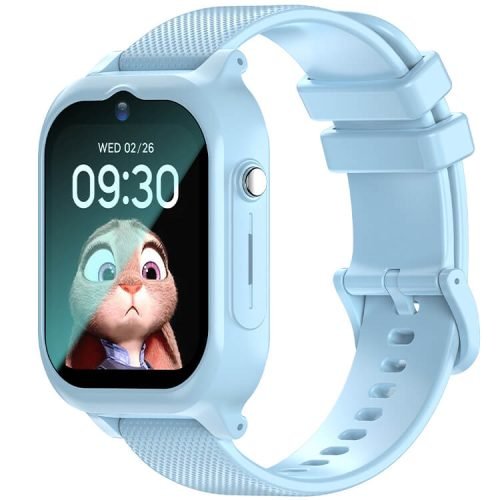
Best First Smartwatch for Kids: REXQU KidView
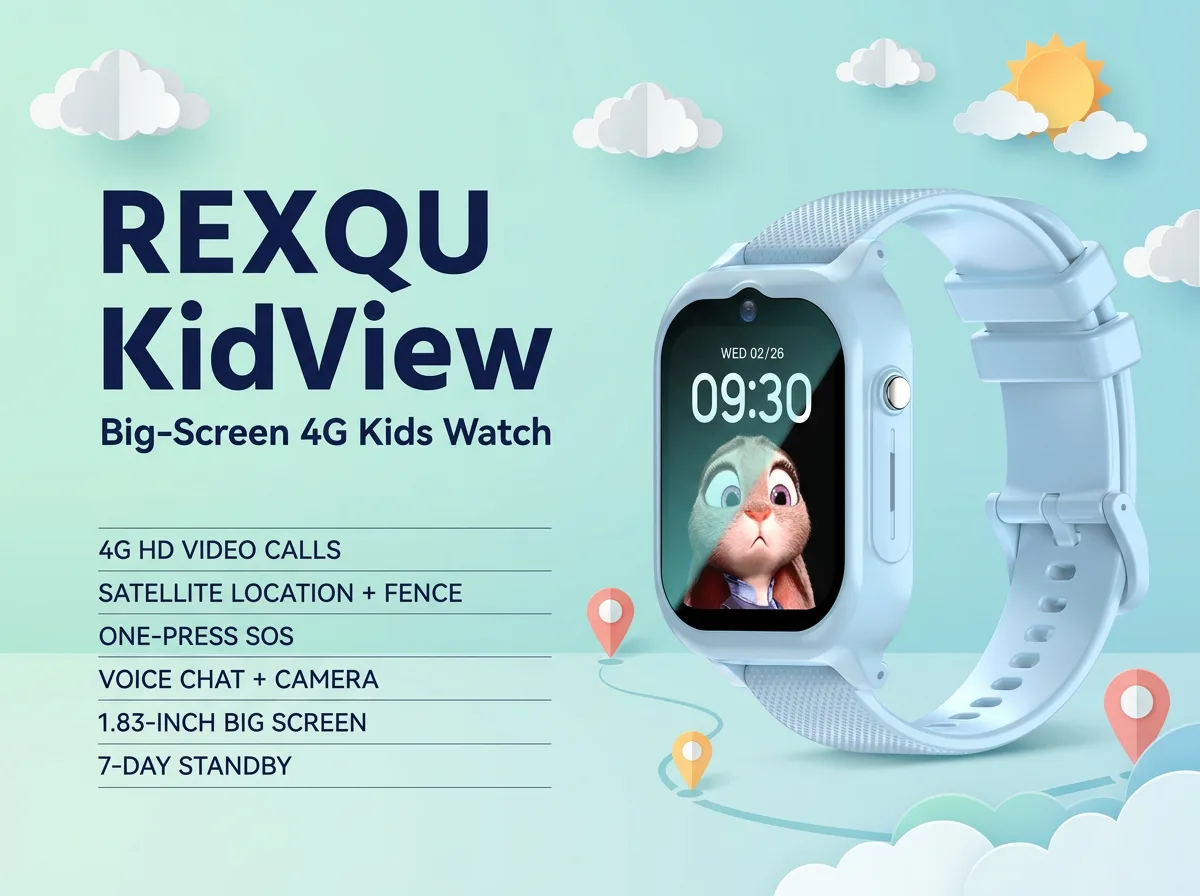
The REXQU KidView is the easiest place to start if your main goal is communication and location without giving a child an open smartphone-style environment.
Its 1.83-inch screen is the largest of the three REXQU kids models, which can make icons and calls easier to use for a younger child. Its interface is built around a fixed set of functions rather than an open app store or browser, so the watch remains focused on calling, location and parent-approved features.
KidView also includes location tracking, geofence alerts, route playback, voice/video communication and SOS functionality through the parent-controlled setup.
Choose KidView if:
- this is your child’s first connected watch;
- a larger display matters;
- you want a closed, simplified interface;
- you want calling, GPS and safe-zone features without handing over a full smartphone.
Best Lightweight Kids Smartwatch: REXQU KidTrack
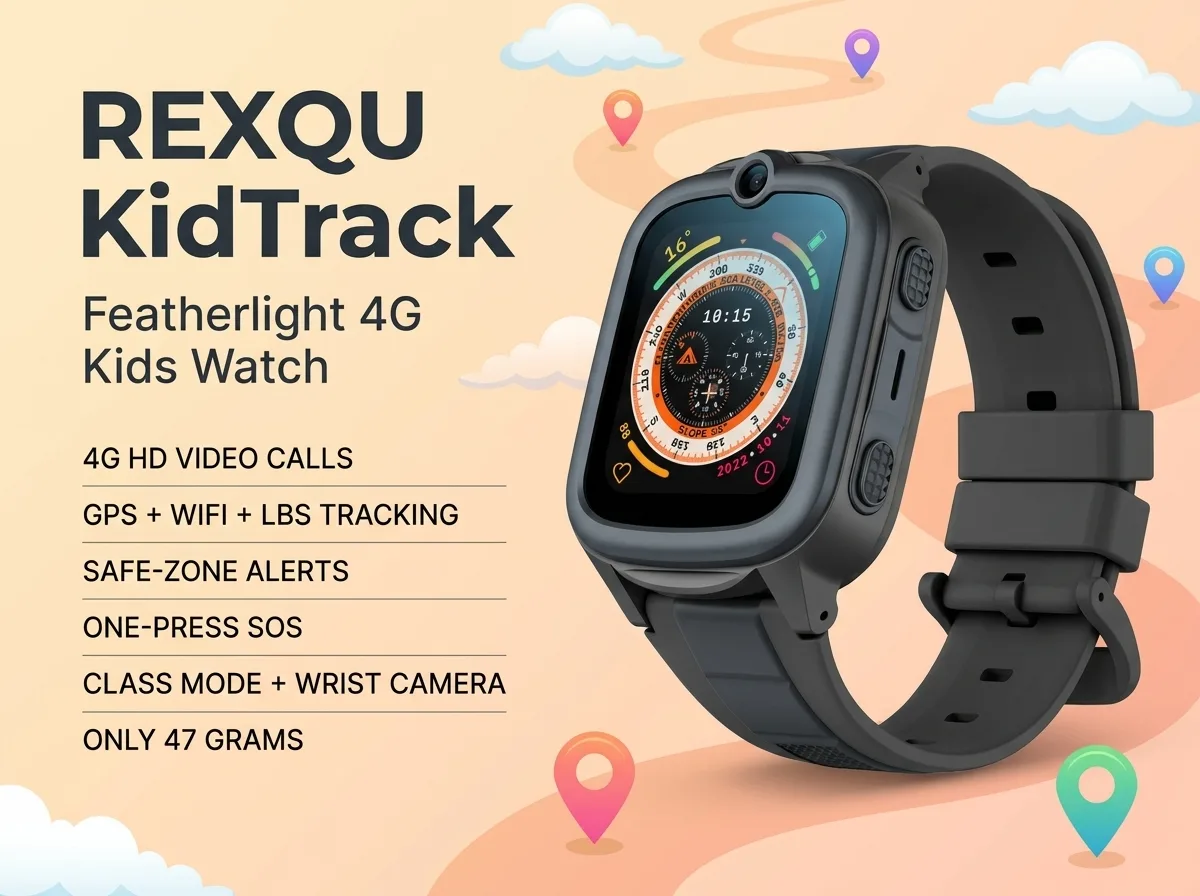
The REXQU KidTrack is the most affordable model in the current REXQU kids range and is particularly appealing when weight and comfort matter.
At about 47 grams according to REXQU’s published specifications, it is designed for smaller wrists and everyday wear. That may sound like a minor difference on paper, but a child who finds a watch bulky is much more likely to take it off — which defeats the point of buying a location and communication device in the first place.
KidTrack combines GPS/location features, parent-managed contacts, calling, geofencing and SOS with a 1.52-inch display.
Choose KidTrack if:
- you want the lowest-priced REXQU kids watch;
- your child has a smaller wrist;
- comfort and lightweight wear matter more than having the largest screen;
- you still want the core GPS, calling and parent-control functions.
Best Kids Smartwatch for Location Features: REXQU KidGuard Pro
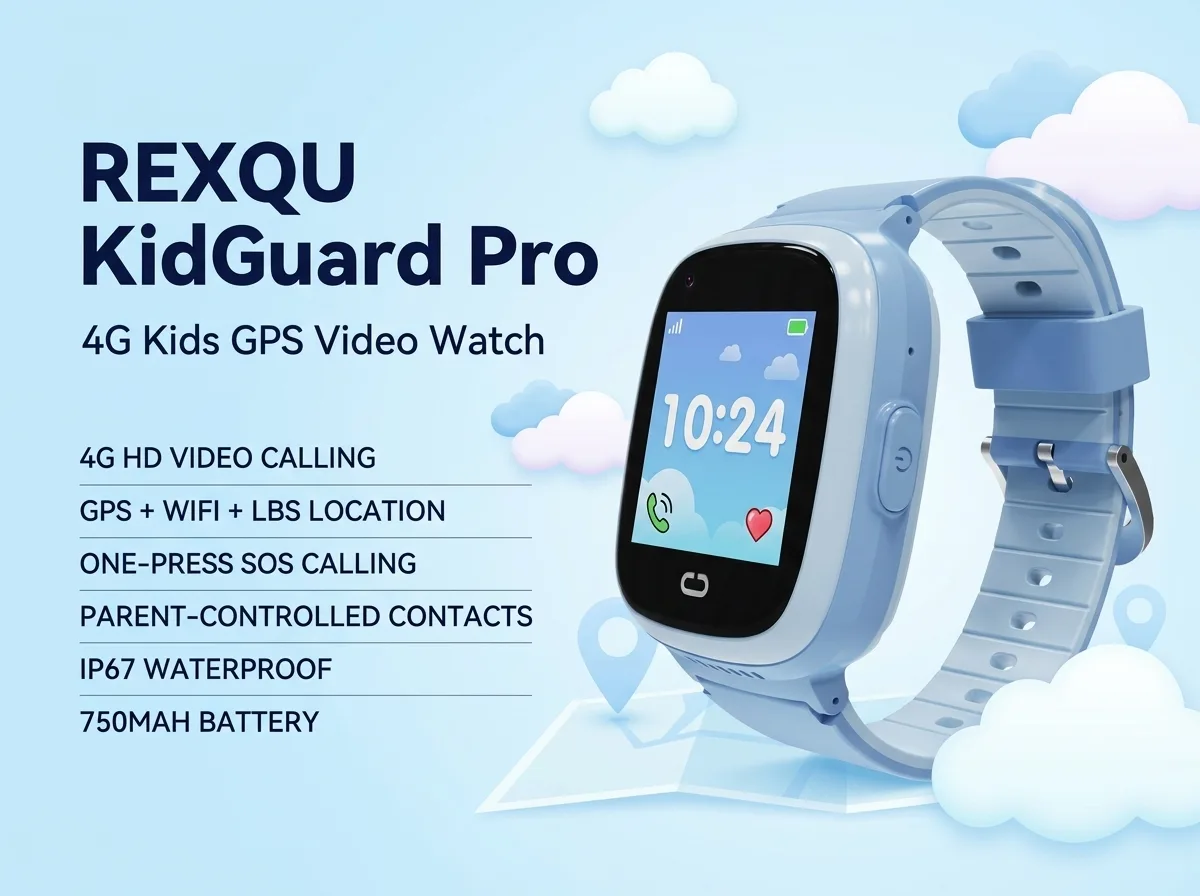
The REXQU KidGuard Pro is the strongest fit when location visibility is the main reason for buying. Its published positioning setup combines GPS, AGPS, WiFi and LBS/cell-tower information rather than depending on GPS satellites alone.
That layered approach matters because GPS usually performs best outdoors with a clear view of the sky, while WiFi and cell-tower location can help provide a usable position when the watch is indoors or surrounded by buildings.
KidGuard Pro also adds video calling/check-in, approved contact controls, route history and an SOS function.
Choose KidGuard Pro if:
- location tracking is your top priority;
- video calling matters;
- your child is becoming more independent;
- you want a more detailed location-oriented feature set.
How Kids Smartwatch GPS Tracking Really Works
“GPS watch” is often used as a catch-all term, but many children’s watches actually combine several positioning methods. GPS and AGPS are useful outdoors; WiFi and LBS can provide supporting location information in environments where satellite reception is weaker.
Parents should also understand that no consumer location device provides a perfect dot in every setting. Buildings, signal strength, mobile coverage and the watch’s connection can affect how quickly a location updates.
For a deeper explanation, read the REXQU Kids Smartwatch GPS Tracking Guide.
What Is Kids Smartwatch Geofencing?
Geofencing lets a parent create a virtual boundary around a location such as home, school or an activity centre. When the watch reports that it has crossed the boundary, the parent app can generate an alert.
Geofencing is useful as an awareness tool, but it should not be treated as a guaranteed real-time alarm system. Location updates can occasionally be delayed by weak GPS, WiFi or cellular conditions.
See the dedicated kids smartwatch geofencing guide for setup tips and realistic expectations.
Parental Controls: One of the Most Important Features
A kids smartwatch should not simply be a tiny smartphone on a child’s wrist. Parents should look closely at how contacts are approved, whether unknown callers can reach the watch, and whether the child has access to an open browser or app store.
REXQU’s kids watches are designed around parent-managed contacts and limited interfaces. The exact controls vary by model and companion app, so the parent should complete setup before the child begins wearing the watch.
For a detailed breakdown, read Kids Smartwatch Parental Controls: What Parents Should Check.
Does a Kids Smartwatch Need a SIM Card?
For 4G calling, video calling and mobile data features, these watches require a compatible nano-SIM and active mobile service. The plan is separate from the watch purchase.
Before ordering a SIM, check carrier compatibility and the network bands supported by the specific watch. A children’s smartwatch with the wrong carrier or an inactive data plan may still turn on, but its calling, location updates and app communication may not work as expected.
See REXQU’s kids smartwatch SIM card guide before activating service.
Battery Life: The Feature Parents Often Underestimate
Kids smartwatches typically use more power than a simple activity band because they combine a screen, mobile connection, GPS and calling. Battery life also depends heavily on how often the watch sends location updates or handles calls.
A practical family routine matters more than the maximum standby figure. If your child needs the watch for the school day, build charging into a predictable routine — for example, when they come home or while they are getting ready for bed.
Compare the current models in the kids smartwatch battery-life guide.
How Much Does Kids Smartwatch Weight Matter?
More than many parents expect. A heavy or bulky watch may get removed during school, sport or play. For a smaller child, comfort can be more important than having the largest screen.
If your child already dislikes wearing watches, start with weight and strap comfort before comparing secondary features. The REXQU kids smartwatch weight comparison explains the differences.
Water Resistance: IP67 vs IPX7
Water-resistance ratings are useful for everyday childhood, but parents should not interpret them as permission for every water activity. Rain, hand-washing and accidental splashes are very different from swimming, hot showers or prolonged submersion.
KidGuard Pro carries an IP67 rating, while KidView and KidTrack are listed as IPX7. The “X” means the rating does not make the same dust-protection claim, not that the water rating is absent.
Read the waterproof kids smartwatch guide before deciding what your child can safely do while wearing the watch.
Video Calling: Useful or Unnecessary?
Video calling can be reassuring for quick check-ins, especially when a child is at an activity, with a caregiver or travelling between locations. But it also uses more battery and mobile data than a simple voice call.
If video calls are a priority, compare the current models in the kids smartwatch video calling guide.
Privacy and Children’s Connected Devices
Location-enabled children’s devices handle sensitive information, so parents should pay attention to privacy as well as hardware features. Review the companion app permissions, use strong account passwords and avoid sharing login credentials beyond trusted caregivers.
The U.S. Federal Trade Commission’s children’s privacy resources provide useful background on the rules and issues surrounding connected products and children’s data.
Kids Smartwatch Setup Checklist for Parents
- Install and secure the parent app. Use a strong password.
- Insert and activate the correct SIM. Test data and calling before relying on the watch.
- Add approved contacts. Remove any numbers the child does not need.
- Set SOS contacts. Put the most reliable responder first.
- Create home and school safe zones. Test alerts before assuming they work exactly as expected.
- Make a test call. Confirm microphone, speaker and mobile signal.
- Test location tracking outdoors and indoors. Learn how the app behaves in your own area.
- Teach the child how to use SOS. Practice once so the function is familiar.
- Create a charging routine. A safety feature cannot help when the battery is dead.
Frequently Asked Questions
What is the best kids smartwatch overall?
There is no single best model for every family. KidView is strongest as a simple first watch, KidTrack is the lightweight value choice, and KidGuard Pro is the more location-focused option.
Can strangers call a kids smartwatch?
REXQU’s kids models are designed around parent-approved contact lists. Parents should configure the contact whitelist in the companion app before handing over the watch.
Does a kids smartwatch replace a smartphone?
For younger children, it can cover some basic communication and location needs without providing a full smartphone environment. It is not a complete phone replacement for every family or age group.
Can a GPS kids watch replace supervision?
No. Location tracking, geofencing and SOS are additional tools. They do not guarantee a child’s safety and should not replace age-appropriate supervision, communication and family rules.
Which REXQU kids smartwatch is cheapest?
KidTrack is currently the lowest-priced of the three models compared in this guide.
Which REXQU kids watch has the largest screen?
KidView has the largest published display of the three at 1.83 inches.
Compare the Three REXQU Kids Smartwatches
Bottom Line
The best kids smartwatch is the one that fits your family’s real priorities. Choose KidView for a larger, simpler first-watch experience, KidTrack for lightweight value, or KidGuard Pro when location tracking and video check-in are most important.
Browse the full REXQU kids smartwatch collection for current colours, specifications and pricing.
Kids smartwatches are communication and location tools, not substitutes for adult supervision or emergency services. Location accuracy and alert timing can vary with GPS visibility, network coverage, WiFi availability and app connectivity.