
Kids smartwatch video calling gives a child a simple way to see and speak to a trusted adult without carrying a full smartphone. On REXQU’s current kids watches, the feature works through the watch’s own 4G connection and parent-managed contacts, so the experience is designed around short check-ins rather than open smartphone-style calling.
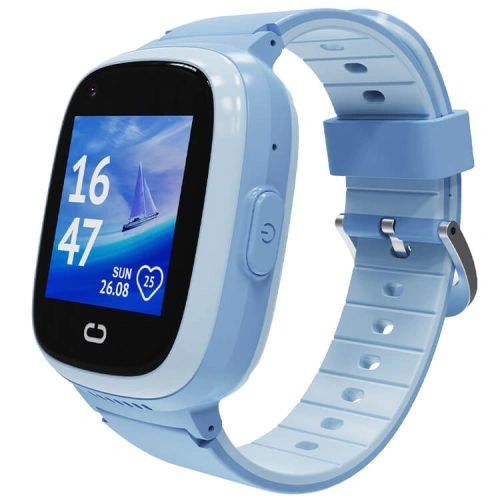
How Kids Smartwatch Video Calling Works
A video call on a kids smartwatch uses three parts together:
- the watch’s built-in camera, microphone and speaker;
- a compatible 4G nano-SIM and mobile data connection;
- the parent-controlled contact and companion-app setup.
The watch sends audio and video over the mobile network in much the same way a connected phone does, but with a simpler child-facing interface and a smaller screen.
Why a Data Plan Is Required
Voice calls can sometimes work acceptably on a weaker connection, but video requires more bandwidth. If the watch has poor mobile signal, you may see:
- lower picture quality;
- audio delay;
- freezing or dropped video;
- a failed call attempt.
That is why a compatible SIM and good coverage matter. Before activating service, read the REXQU Kids Smartwatch SIM Card Guide.
REXQU KidGuard Pro Video Calling
The REXQU KidGuard Pro combines video calling with its strongest location-focused feature set: GPS, AGPS, WiFi and LBS/cell-tower positioning, route history, geofencing, approved contacts and SOS.
That makes KidGuard Pro a good choice when video calling is part of a broader “check where they are and check in visually” use case.
REXQU KidView Video Calling
The REXQU KidView has the largest published screen in the current REXQU kids lineup at 1.83 inches. That makes it particularly suitable if your child will actually use the screen for video calls rather than only for location and voice communication.
KidView also includes parent-managed contacts, safe-zone functions and route playback in a simplified first-watch interface.
REXQU KidTrack Video Calling
The REXQU KidTrack is the lighter, lower-priced model in the range. If your child has a smaller wrist or is likely to remove a heavier watch, comfort may matter more than having the largest screen.
KidTrack still provides connected calling and parent-app features while keeping the watch relatively lightweight.
Kids Smartwatch Video Calling Comparison
| Model | Video-call advantage | Best for | View |
|---|---|---|---|
| KidGuard Pro | Video check-in paired with layered location features | Parents prioritizing location + visual check-in | KidGuard Pro → |
| KidView | Largest screen in the range | Children who will use the screen often | KidView → |
| KidTrack | Lighter, lower-cost connected watch | Smaller wrists and everyday wear | KidTrack → |
Video Calling and Parental Controls
Video calling is only useful if parents control who can reach the child. REXQU’s kids watches are designed around parent-managed contacts, so setup should begin in the companion app rather than on the child’s wrist.
Before the first call:
- Add only trusted contacts.
- Test an incoming call from an approved number.
- Confirm the child can identify who is calling.
- Teach the child when it is appropriate to answer.
- Review the approved-contact list regularly.
For more detail, see the kids smartwatch parental controls guide.
Video Calling vs Voice Calling
Video is useful when seeing the child adds reassurance — for example, after school, at an activity or with a caregiver. Voice calling is usually quicker and uses less battery and data.
A practical family rule is to use voice for routine communication and video for moments when visual confirmation is helpful.
How Much Battery Does Video Calling Use?
Video calling can be one of the heaviest battery uses on a kids smartwatch because the screen, camera, microphone, processor and mobile data connection are all active at the same time.
If your child makes several video calls in a day, expect shorter runtime than the watch’s standby figure suggests. Compare model expectations in the kids smartwatch battery-life guide.
How Mobile Coverage Affects Video Calls
A 4G badge on the watch does not guarantee perfect video everywhere. Network conditions vary by carrier, location and whether the child is indoors.
In the United States, the FCC explains how consumers can compare reported mobile coverage on the National Broadband Map. Even then, indoor performance can differ from outdoor coverage.
Video Calling and GPS Tracking
Video and GPS use the same broader connectivity ecosystem: the watch needs a working mobile connection to communicate with the parent app away from WiFi.
If the video call fails and the location also stops updating, check the SIM, data service and signal before assuming the watch hardware is defective.
See the kids smartwatch GPS tracking guide for location-specific troubleshooting.
Privacy and Kids Smartwatch Video Calling
A camera on a child’s wrist deserves thoughtful setup. Parents should control who can call, keep the companion-app account secure and explain simple family rules about where video calls are appropriate.
For example, parents may want to discourage video calling during class, in changing areas or anywhere another child could be recorded without permission.
The FTC’s children’s privacy resources provide useful background on connected products and children’s data.
Video Calling Setup Checklist
- Compatible nano-SIM installed
- Voice and data plan active
- Parent app installed
- Approved contacts added
- Camera and microphone tested
- Test call made on WiFi if supported
- Test call made on mobile data
- Child taught how to answer and end a call
- Charging routine established
Frequently Asked Questions About Kids Smartwatch Video Calling
Can strangers video-call the watch?
REXQU’s kids watches are designed around parent-managed approved contacts. Parents should configure and test the contact controls before handing over the watch.
Does video calling work without a SIM?
When away from WiFi, the watch needs a compatible mobile data connection for 4G video calling. The exact behavior without a SIM can vary by model and network setup.
Does video calling use a lot of data?
It uses more data than location updates or a simple voice call. The amount varies with call length and video quality.
Which REXQU kids watch is best for video calling?
KidView is attractive if the larger screen matters most, while KidGuard Pro is stronger if video check-in is part of a broader location-tracking setup. KidTrack is the lightweight value choice.
Can video calling replace a smartphone?
For some younger children, a kids smartwatch can cover basic family communication without giving them a full smartphone environment. It is not a complete phone replacement for every age or family.
Bottom Line
Kids smartwatch video calling works best as a short, parent-controlled communication tool. Choose a compatible SIM, test mobile coverage, configure approved contacts and build charging into the routine.
Compare all three models in the Best Kids Smartwatch buying guide or browse the full REXQU kids smartwatch collection.
Video-call quality depends on network coverage, mobile data, app connectivity and device settings. Kids smartwatches are communication and location tools, not substitutes for adult supervision or emergency services.