
Kids smartwatch parental controls are one of the most important reasons to choose a child-focused watch instead of handing over a full smartphone. The useful question is not whether the watch has “parental controls” written on the product page, but what the parent can actually manage: approved contacts, SOS numbers, location settings, safe zones and the child’s access to communication features.
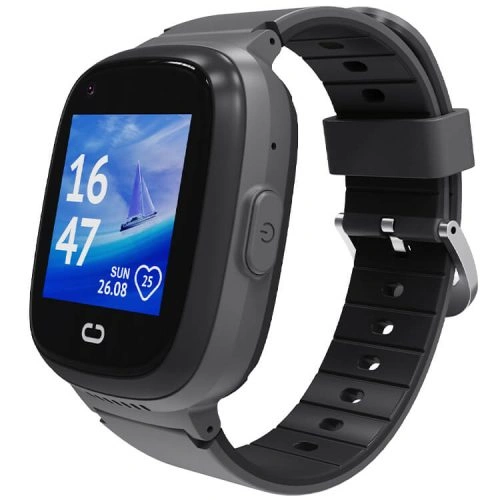
What Do Kids Smartwatch Parental Controls Actually Cover?
On a child-focused smartwatch, parental controls typically cover several areas at once:
- Approved contacts: the parent decides which numbers can call or message the watch.
- SOS contacts: the parent sets the trusted numbers used by the emergency function.
- Location tracking: the parent can view the watch’s reported position in the companion app.
- Geofencing: the parent can create safe zones and receive boundary alerts.
- Communication settings: the watch is designed around parent-approved calling rather than open access to strangers.
- App-level management: most configuration happens in the parent’s companion app rather than on the child’s watch.
The key principle is simple: the parent should be the administrator of the device.
Why Approved Contacts Matter More Than an Open Phonebook
A kids smartwatch is most useful when the child can easily reach family without the watch becoming an open communication channel. Parent-managed contact lists help keep the device focused on trusted people.
Before giving the watch to a child, add only the numbers they genuinely need: parents, guardians, perhaps a grandparent, school contact or another trusted caregiver. Avoid loading the watch with a large list “just in case.” A shorter, clearer list is easier for a child to understand and easier for a parent to manage.
REXQU KidGuard Pro Parental Controls
The REXQU KidGuard Pro is the strongest fit if your priority is a more detailed parent-managed setup. Its published features combine approved contacts with SOS, route history, geofencing, GPS/AGPS/WiFi/LBS positioning and video calling.
That makes KidGuard Pro particularly useful for parents who want communication and location controls in the same app.
REXQU KidTrack Parental Controls
The REXQU KidTrack is the lightest and lowest-priced model in the current REXQU kids lineup. Its parent app manages approved communication and electronic-fence safe zones alongside location tracking.
KidTrack is a good choice when you want core parental controls without putting a heavier watch on a smaller wrist.
REXQU KidView Parental Controls
The REXQU KidView combines parent-managed contacts and safe-zone features with a larger 1.83-inch display and a simplified, closed set of child-facing functions.
That makes KidView especially appealing as a first connected watch for a younger child who needs calling and location features without a full smartphone-style environment.
Kids Smartwatch Parental Controls Compared
| Model | Parent-control emphasis | Best for | View |
|---|---|---|---|
| KidGuard Pro | Approved contacts, SOS, geofencing, route history, video calling | Most location-focused parent setup | KidGuard Pro → |
| KidTrack | Approved contacts, electronic-fence alerts, location | Lightweight value | KidTrack → |
| KidView | Approved contacts, safe zones, simplified interface | First smartwatch for younger children | KidView → |
How to Set Up Kids Smartwatch Parental Controls
- Activate the SIM and data connection. Make sure calling and remote app functions work away from home WiFi.
- Install the correct parent app. Use the app listed for the specific watch model.
- Create a strong account password. Do not reuse an easy household password.
- Add approved contacts. Start with only the people your child actually needs.
- Add SOS contacts in priority order. Put the most reliable responder first.
- Set geofences. Home and school are sensible first zones.
- Test an incoming call from an approved number.
- Test an unapproved number if the app supports whitelist blocking.
- Test the SOS function together. Make sure the child knows when and how to use it.
- Review the setup every few months. Remove old contacts and update routines as needed.
Parental Controls and Geofencing Work Better Together
Contact controls tell you who can reach the child. Geofencing tells you when the watch reports that it has moved across a safe-zone boundary. Together, those features create a more useful parent setup than either one alone.
If location boundaries are important, read the REXQU kids smartwatch geofencing guide.
Parental Controls and GPS Tracking
Parents should understand that GPS is not perfectly precise in every environment. Buildings, trees, weak mobile coverage and indoor use can affect the watch’s reported position.
For realistic expectations around location accuracy, see the kids smartwatch GPS tracking guide.
Why the SIM Card Matters to Parental Controls
Remote parental controls depend on communication between the watch and the parent app. When the watch is away from WiFi, that connection normally relies on the mobile network.
If the SIM is inactive, incompatible or poorly covered in your area, some remote features may not update properly even though the watch itself powers on.
Read the kids smartwatch SIM card guide before choosing a plan.
Should a Kids Smartwatch Have a Browser or App Store?
For many younger children, a major benefit of a dedicated kids watch is that it avoids the open-ended environment of a smartphone. A child often needs only a small set of functions: call a trusted adult, receive a call, share location, trigger SOS and perhaps make a video call.
That simplicity can be more useful than giving the child dozens of apps they do not need. When comparing watches, check the actual interface rather than assuming every “kids smartwatch” is equally restricted.
Kids Smartwatch Privacy: What Parents Should Review
Location-enabled children’s devices can handle sensitive data such as location history, contact information and account details. Parents should secure the app account carefully and limit access to trusted caregivers.
Useful steps include:
- use a unique password;
- do not share the parent-app login casually;
- review app permissions;
- remove former caregivers or old contacts;
- keep the parent phone protected with a passcode or biometric lock;
- review the company’s privacy information before relying on location features.
The U.S. Federal Trade Commission’s children’s privacy resources provide useful background on connected products and children’s data.
How Often Should Parents Review the Settings?
Parental controls should not be treated as a one-time setup. Children’s routines change. Schools, caregivers, after-school activities and phone numbers change too.
A practical approach is to review the watch every few months and whenever there is a major routine change. Check:
- approved contacts;
- SOS order;
- safe zones;
- SIM status;
- battery health and charging routine;
- parent-app login access.
Which REXQU Kids Watch Has the Best Parental Controls?
It depends on what you mean by “best.” KidGuard Pro is the strongest choice if you want a more location-focused combination of approved contacts, SOS, route history and video check-in. KidView is attractive as a simpler first watch with a larger display, while KidTrack keeps the setup lightweight and affordable.
For a full model-by-model comparison, read the Best Kids Smartwatch buying guide.
Frequently Asked Questions About Kids Smartwatch Parental Controls
Can my child add contacts without me?
REXQU’s child-focused models are designed around parent-managed contact lists. Parents should configure and review the contact list in the companion app.
Can strangers call the watch?
The watches are designed to use approved-contact controls. Exact behavior depends on the model and app configuration, so parents should test the whitelist themselves during setup.
Do parental controls work without WiFi?
Remote functions can work through the watch’s mobile connection when a compatible active SIM and data service are available.
Is there a monthly REXQU parental-control subscription?
The companion-app features themselves are not sold by REXQU as a separate monthly subscription. You may still need to pay your mobile carrier for the SIM/data plan.
Can parental controls guarantee my child’s safety?
No. Approved contacts, GPS, geofencing and SOS are useful tools, but they do not replace adult supervision, family rules or emergency services.
Bottom Line
Good kids smartwatch parental controls should make the device simpler and safer to manage, not more complicated. Set up approved contacts, SOS numbers, location features and safe zones before your child starts wearing the watch, then test the system yourself.
Compare the KidGuard Pro, KidTrack and KidView, or browse the full REXQU kids smartwatch collection.
Kids smartwatches are communication and location tools, not substitutes for adult supervision or emergency services. Exact parental-control behavior depends on the model, app version, SIM/network connection and settings configured by the parent.