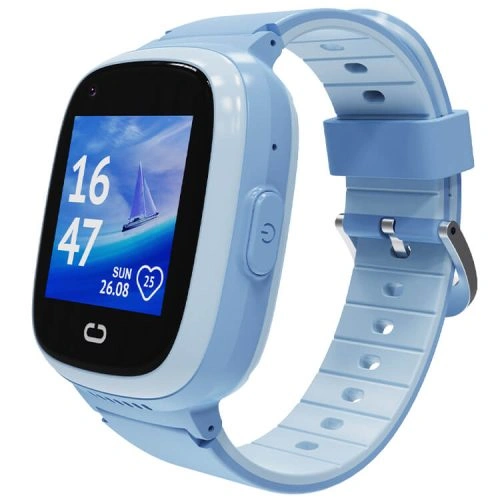
REXQU KidGuard Pro
An all-rounder with 4G video calling, multi-source location features, one-press SOS and an IP67-rated body.
4G Video CallsGPS + SOSIP67 Rated
3 Colors Available
$109.97
A kids smart watch that calls you back and shows where they are — without handing them a phone.
A kids smart watch keeps them reachable and locatable without a phone in their pocket. Compare REXQU kids smartwatches for 4G voice or video calling, GPS location features, safe-zone alerts, SOS and parent-managed contacts. Models differ in screen size, battery, app controls and location tools. A compatible nano-SIM and mobile plan may be required, and GPS/SOS features depend on setup, signal, battery and connectivity.
Compare specs & pricesCompare kids watches by calling, location tools, safe-zone features, SOS, screen size, battery, weight and SIM requirements.
An all-rounder with 4G video calling, multi-source location features, one-press SOS and an IP67-rated body.
3 Colors Available
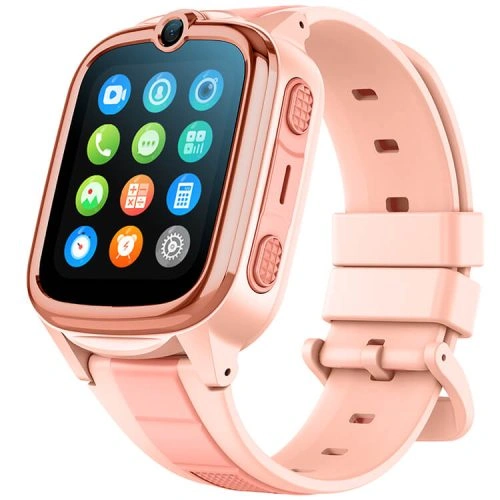
A lightweight option with HD video calling, location features, electronic-fence safe zones and parent-managed calling controls.
3 Colors Available
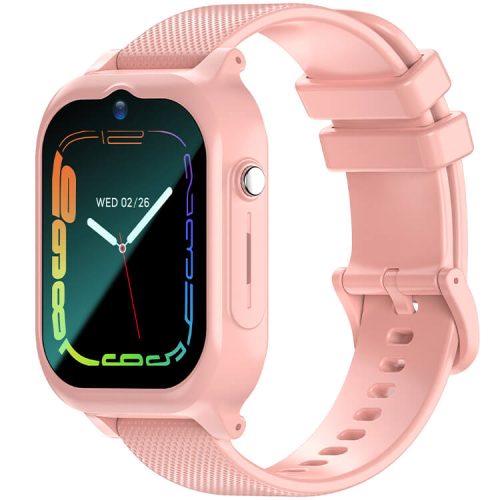
A large-screen option with a 1.83″ IPS display, 4G HD video calling, route-history features and extended standby time.
3 Colors Available
All three call, video-call, track location and carry SOS — they differ in battery, weight and screen.
| Model | Screen | Battery | Location Tools | Stand-out Feature | Price |
|---|---|---|---|---|---|
| REXQU KidGuard Pro | 1.4″ IPS, 2.5D glass | 750mAh | GPS + AGPS + WiFi + LBS, route history | IP67-rated body | $109.97 |
| REXQU KidTrack | 1.52″ color touch | 700mAh | GPS + WiFi + LBS + AGPS, safe zones | Lightweight 47g design | $89.97 |
| REXQU KidView | 1.83″ IPS | 700mAh | Location tools, route history, safe zones | Large display | $99.97 |
A kids smartwatch can provide a simpler communication option for families who are not ready to give a child a full smartphone. Depending on the model, features can include voice or video calling, parent-managed contacts, GPS-based location tools, safe-zone alerts and an SOS button, all from a device worn on the wrist.
The important question is not just which watch has the most features, but how those features work. Location accuracy can vary with GPS reception, Wi-Fi, mobile-network coverage and the positioning method being used. Safe-zone alerts can be delayed, and SOS functions can fail if the watch is not charged, connected or configured correctly. Treat these tools as useful family aids, not as a substitute for adult supervision or a guaranteed emergency-response system.
Choose by the child and the use case. The KidGuard Pro emphasizes 4G video calling, multi-source location tools and an IP67-rated body; the KidTrack is a lightweight option with safe-zone features; and the KidView offers a larger display with route-history features. Check the exact contact controls, SIM requirements, LTE-band compatibility, app features and battery specifications on each product page before buying.
For more detail, use the Kids Smartwatch Buying Guide, the SIM-card guide and the GPS tracking guide.
A kids smart watch is really three products in one — a phone, a locator and a wearable a child has to want to wear. Most of the disappointment comes from the parts nobody mentions in the listing: the SIM, the app, the privacy terms and how the battery behaves once location is switched on.
A kids smart watch that calls or reports its position needs a mobile connection, which means a SIM and a plan, usually bought separately and not always compatible with every network band. This is the single most common reason a watch arrives and does nothing. Our guide to kids smartwatch SIM cards explains what to check before you order, and the no-internet options cover what still works without a plan.
GPS gives you a position accurate to a few metres under open sky, but indoors — in a school building, a shopping centre, a basement — the watch usually falls back to mobile masts or Wi-Fi, which can be out by hundreds of metres. Treat the map as a neighbourhood, not a doorway. How kids smartwatch GPS tracking works goes through it properly.
A kids smart watch is a continuous stream of a child’s movements sitting on somebody’s server. Under the FTC rules implementing COPPA, services directed at children under 13 need verifiable parental consent before collecting personal information, and parents can ask to see and delete what has been collected. Before you set the watch up, find the app’s privacy policy and check who holds the data and for how long. Our parental controls guide covers the settings worth changing on day one.
Standby figures assume the watch is idle, and a kids smart watch is rarely idle. Frequent location updates and video calls are the two heaviest jobs, and a watch that lasts days in a drawer can need charging nightly in real use. Set the update interval to the longest you are comfortable with rather than the shortest available.
Playgrounds, sinks and rain are the real durability test for any kids smart watch, so a water-resistance rating matters more here than on an adult watch — see waterproof kids smartwatches. Screen size, strap comfort and whether your child will actually keep the kids smart watch on decide the rest. The full kids smartwatch buying guide compares the range side by side.
The best choice depends on your child and what you need the watch to do. The KidGuard Pro emphasizes 4G video calling, location tools and an IP67-rated body; the KidTrack is a lightweight option with safe-zone features; and the KidView offers a larger display and route-history features.
Models with 4G calling and mobile-data location features generally require a compatible nano-SIM and active plan, which are not included. LTE-band and carrier compatibility can vary, so check the product specifications and confirm support with your carrier before buying.
There is no single correct age. Consider the child’s wrist size, ability to use the controls, school rules, communication needs and whether they understand how and when to use SOS or calling features. Check the individual product dimensions and controls before choosing.
Selected REXQU kids watches include parent-managed contact or whitelist features through their companion apps. The exact controls vary by model and app, so check the product page before relying on a specific contact-blocking function.
Selected models use combinations of GPS, Wi-Fi, LBS or other positioning methods to show location information in the parent app. Accuracy and update timing can vary with signal, environment, network coverage, battery and the positioning method being used.
It is better to think in terms of water resistance. The KidGuard Pro is listed with an IP67 rating, while other kids models may use different ratings. Water-resistance ratings apply under specific test conditions and do not mean a watch is suitable for every water activity. Check the individual product page and care instructions before swimming or bathing.
REXQU does not require a monthly REXQU subscription for these watches. However, models that use 4G calling or mobile data require a compatible SIM plan from a carrier, and carrier charges are separate.
No. These are useful family tools, but they can be affected by battery level, GPS reception, mobile or Wi-Fi coverage, app permissions and setup. A kids smartwatch should not be treated as a guaranteed location or emergency-response system.