
A kids smartwatch call whitelist is the feature that decides whether a stranger can actually reach your child’s wrist — not just whether the watch can make calls at all. All three current REXQU kids models — KidGuard Pro, KidTrack and KidView — build calling around a parent-approved contact list rather than an open phone number, but how strict that list is varies by model.
How a Kids Smartwatch Call Whitelist Actually Works
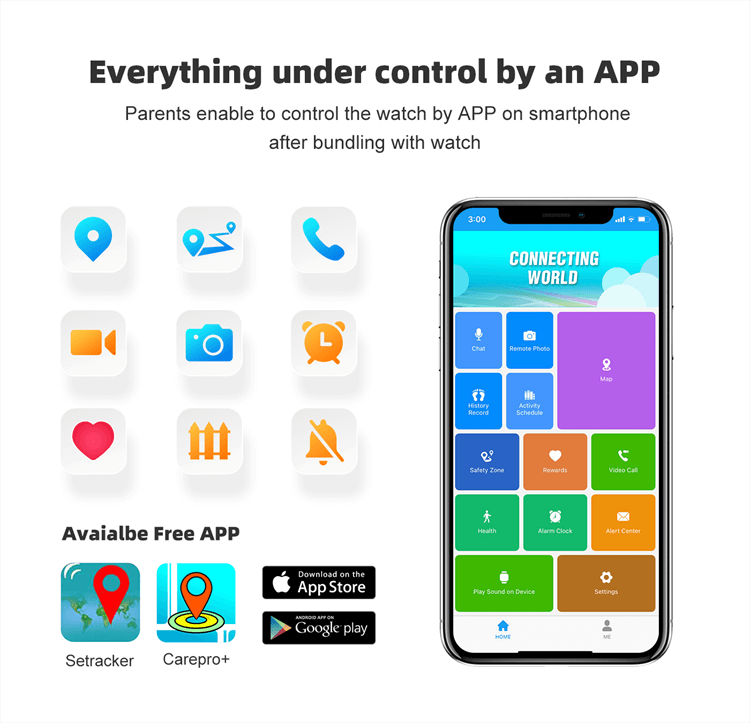
In practice, a kids smartwatch call whitelist means the watch only rings for numbers a parent has already added in the companion app — everyone else is rejected automatically, with no option for the child to answer or even see the call. Setup happens entirely on the parent’s side: open the free app, add the people your child is allowed to talk to, and the watch enforces that list going forward.
REXQU’s KidTrack describes this directly as an “incoming-call whitelist that keeps strangers out,” run from the same parent app that manages safe zones and location history. The KidGuard Pro frames it slightly differently — “the free parent app manages contacts, geo-fence zones and history routes — and rejects unknown callers” — but the underlying behavior is the same: no number on the list, no call gets through.
KidGuard Pro vs. KidTrack vs. KidView: Whitelist Comparison
| Model | Call Whitelist | Contacts Supported | SOS Numbers | Price |
|---|---|---|---|---|
| REXQU KidGuard Pro | Yes — rejects unknown callers | Up to 15 trusted contacts | 3 SOS numbers | $109.97 |
| REXQU KidTrack | Yes — parent-managed whitelist | Parent-approved list | Whitelisted SOS contacts | $89.97 |
| REXQU KidView | Approved-contacts only (no stray calls) | Parent-approved list | Approved SOS numbers | $99.97 |
The KidGuard Pro is the most explicit about the number: up to 15 trusted contacts, plus 3 separate numbers dedicated to its SOS function. KidTrack and KidView both run on the same approved-contacts principle, with KidTrack adding a dedicated incoming-call whitelist description and KidView keeping every voice note, video call and SOS contact limited to numbers “you approved.”
Why the Whitelist Matters More Than the Calling Feature Itself
A kids smartwatch call whitelist is really a scam- and stranger-contact filter sitting in front of a phone number your child can’t screen themselves. Robocalls and spoofed numbers increasingly target any active phone line, including the nano-SIM inside a kids smartwatch — so a watch that rings for any incoming number, rather than only pre-approved ones, hands that screening job to a child who isn’t equipped to do it.
This is also why the whitelist setup should happen before the watch goes on your child’s wrist, not after. Add every number you want reachable — grandparents, school pickup contacts, a second parent — and test an actual call from an unlisted number to confirm it’s genuinely rejected rather than just silenced.
Setting Up the Whitelist Correctly
A few practical steps make the kids smartwatch call whitelist worth relying on:
- Add contacts in the parent app before the first day your child wears the watch, not as an afterthought.
- Review the list every few months — kids’ schedules change, and so do the adults who should be reachable.
- Pair the whitelist with the watch’s SOS function so emergency contacts are also pre-approved, not something your child has to add themselves.
- Test the rejection behavior once with a number that isn’t on the list, so you know exactly what your child will (and won’t) see.
All three REXQU kids watches build calling around a parent-controlled contact list rather than an open line, but the KidGuard Pro’s published 15-contact, 3-SOS-number structure is the most specific about exactly what “whitelist” covers. Compare the full feature set in REXQU’s kids smartwatch buying guide, or see KidGuard Pro, KidTrack and KidView individually. Browse REXQU’s full kids smartwatches lineup for current pricing and colors. For background on the kind of unwanted calls a whitelist is built to block, see Wikipedia’s overview of the robocall.