
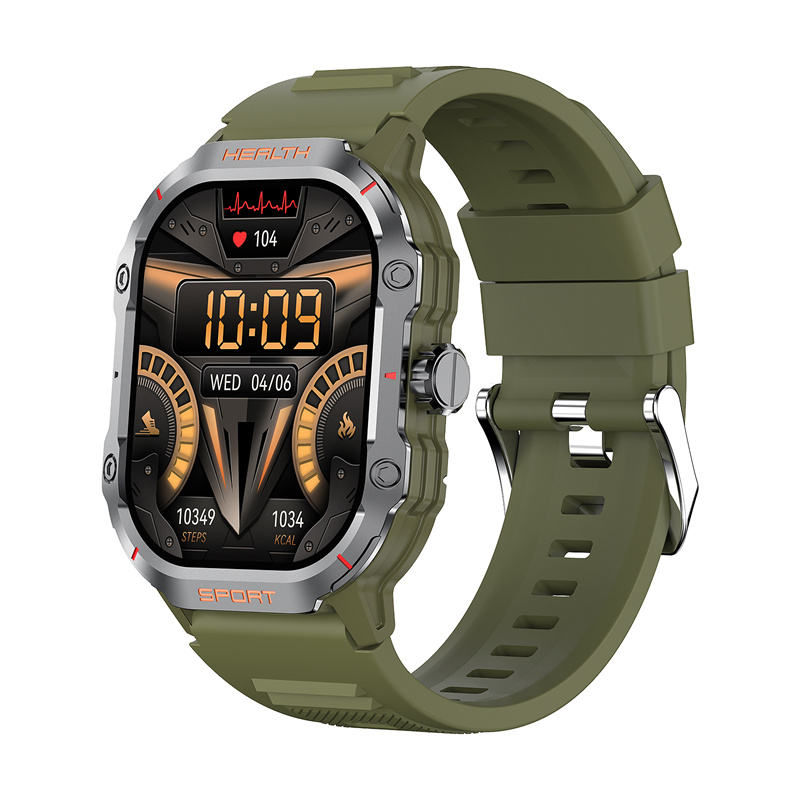
Shopping for a smartwatch for seniors watch faces that are actually easy to read at a glance, not just stylish in a product photo? The REXQU VistaMax comes with a large selection of dial designs on its 2.01-inch AMOLED display, and a few practical details make some of those faces easier to read quickly than others.
Smartwatch for Seniors Watch Faces: What’s Available
The VistaMax ships with a massive dial selection built in, from simple digital faces showing just the time and date in large numerals to busier analog-style faces that also show heart rate, steps, and battery life at once. Because the screen is a 2.01-inch AMOLED panel, contrast stays sharp and colors stay vivid even in a design with a lot of information packed onto one face. That’s the core of what REXQU offers in smartwatch for seniors watch faces: plenty of variety without sacrificing legibility.
Picking a Face That’s Easy to Read Quickly
When people ask about the best smartwatch for seniors watch faces, the simplest digital layout is usually the right answer. A digital face with large, high-contrast numerals for the time, plus one or two data points like heart rate or the date, is typically faster to read at a glance than a crowded analog face with small icons. The AMOLED display helps here too — true blacks mean the digits themselves stand out sharply rather than competing with a lit background.
Changing Faces Without Digging Through Menus
Switching between faces on the VistaMax is a matter of pressing and holding the display and swiping through the available options, rather than hunting through a settings menu. That matters in daily use: a family member who’s unfamiliar with smartwatches can try a few faces and settle on whichever one is easiest for them to read, without needing a tutorial first.
Other VistaMax Details Worth Knowing
Beyond the dial selection, the VistaMax weighs just 37 grams, is IP68 water resistant, and uses magnetic charging, with 5–7 days of typical use and up to 25 days on standby. It also tracks heart rate, offers multiple exercise modes, and includes a weather forecast, all shown through whichever face you choose.
Adjusting Brightness for Outdoor Readability
Any watch face, however well designed, is harder to read in direct sunlight if the screen brightness is set too low. The VistaMax’s AMOLED panel can be set to a higher fixed brightness or left on auto, which raises the level automatically outdoors and dims it again indoors to save battery. For anyone struggling to read a face outside, checking that auto-brightness is turned on — or simply raising the manual brightness a notch — often solves the problem faster than switching to a different face altogether.
FAQ
Can I set a different face for each day? The watch doesn’t auto-rotate faces by day; you choose one and it stays until you swipe to a different one.
Will a busier face drain the battery faster? AMOLED displays use more power for brighter, denser faces than for simple, mostly-dark digital ones, so a plain digital face will generally stretch battery life slightly further.
Is a larger display better for low vision? Generally yes — the VistaMax’s 2.01-inch screen is on the larger end of REXQU’s range, which helps when text size and contrast matter most. This isn’t medical advice; anyone with a diagnosed vision condition should check with an eye care professional about what display size and contrast actually work best for them.
If smartwatch for seniors watch faces are what matters most in your decision, start with the REXQU VistaMax product page to see the display up close. Browse the full range on REXQU’s smartwatches for seniors page, and compare every model side by side in the complete buying guide. For more on how AMOLED technology produces the sharp contrast that makes these faces easy to read, see Wikipedia’s overview of AMOLED displays.