
Looking for how kids smartwatch voice messages actually work before you hand one to your child? On the REXQU KidTrack, voice messages are a push-to-talk style feature built into the same family group chat used for photos and check-ins — not an open messaging app, and not something a stranger can use to reach your child.
Here’s the quick answer: KidTrack’s voice messages record a short clip on the watch and send it to a parent-managed family group in the companion app, where every member is a contact the parent has already approved. There’s no public feed, no open contact list, and no way for someone outside that approved group to send or receive a message.
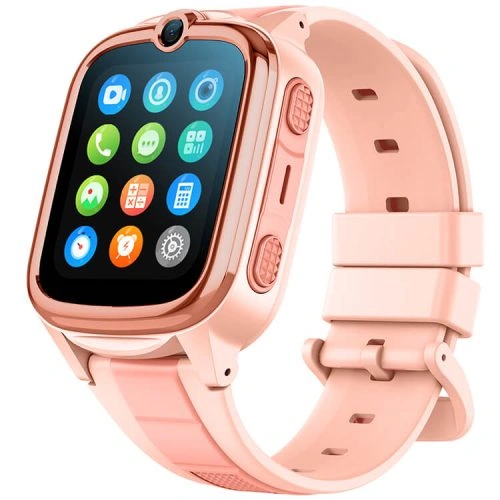
How Kids Smartwatch Voice Messages Work on the REXQU KidTrack
The feature sits alongside KidTrack’s other core functions — GPS and LBS location tracking, parent-managed calling, a wrist camera, and step/sleep tracking — rather than replacing any of them. A child presses and holds the voice message icon, speaks, and releases to send. The clip appears in the family group chat inside the parent app, where it can be played back, replied to with another voice message, or responded to with a regular call.
Because kids smartwatch voice messages work over the watch’s own connection rather than a general messaging platform, there’s no separate app for a child to download and no account for them to manage outside the one the parent already set up during activation.
Why the Family Group Chat Model Matters
The whole point of putting kids smartwatch voice messages inside a closed family group, instead of giving a child an open messaging app, is to keep the communication circle to people a parent has actually chosen. That group is the same list used for calling and photo sharing on KidTrack, so there’s only one contact list to manage, not three.
- Only parent-approved contacts can send or receive a voice message.
- There’s no public or open messaging layer to configure separately.
- The same approved list governs calling, photos, and voice messages together.
That’s a meaningfully different design from handing a child a hand-me-down phone with a general-purpose messaging app, where access controls have to be configured and maintained on top of software that wasn’t built for a child user in the first place.
Battery Life and Everyday Use
KidTrack’s 700mAh battery is rated for up to a week of standby, with power-saving behavior designed to keep the watch awake for GPS tracking, photos, and voice messages without demanding a nightly charging routine. In practice, a child who sends a handful of voice messages and photos a day alongside normal location tracking shouldn’t need to think about charging more than once every few days.
That matters for a feature like this: a voice message only helps if the watch has enough charge left at pickup time to actually send one, so battery headroom is part of what makes the feature reliable rather than occasional.
Setting Up Voice Messages the Right Way
Before handing over the watch, a few steps make kids smartwatch voice messages work the way they’re supposed to:
- Add only the family members and caregivers who should be in the group chat.
- Test sending and receiving a voice message yourself from the parent app.
- Review the group periodically and remove anyone who no longer needs access, such as a former caregiver.
- Teach your child how to press, hold, and release to record, and how to play back a reply.
Parents who also want calling and a wrist camera in the same device, rather than adding features piecemeal, will find the REXQU KidTrack bundles all three into one family group setup. For a side-by-side look at how KidTrack compares with REXQU’s other kids models, the kids smartwatches category page lists current pricing and specs for the full lineup.
Frequently Asked Questions
Can voice messages be sent to anyone outside the family group?
No. KidTrack’s voice messages only reach contacts a parent has already approved in the companion app — there’s no open directory or public inbox.
Do voice messages need WiFi to send?
KidTrack sends voice messages over its own mobile data connection, the same one used for calling and location updates, so a WiFi network isn’t required as long as the SIM has an active data plan.
How is this different from video calling?
Voice messages are asynchronous — record, send, and the recipient listens whenever they check the app — while video calling connects both sides in real time. KidTrack covers the voice-message side; REXQU’s KidGuard Pro adds live video calling on top of a similar approved-contact setup.
For broader guidance on keeping any connected device appropriate for a child’s age and helping kids use messaging and communication features safely, the National Center for Missing & Exploited Children’s NetSmartz program is a useful family resource worth bookmarking alongside your watch setup.
Set up the family group first, test it yourself, and kids smartwatch voice messages become one more low-friction way for your child to stay in touch — without opening the door to anyone you haven’t already approved.